Address in a free-text field
There is no list of branches and parcel lockers, so the branch number gets lost in a comment and parcels go to the wrong place.
 For Shopify stores that sell in Ukraine
 Nova Poshta with the real delivery price, cash on delivery,
  monobank,
  LiqPay and instalment payments on one page. Orders land straight in your Shopify, and the money goes directly to your account.
Works with the services Ukrainian stores already use
ShopifyNova Poshta UkrposhtamonobankLiqPay
 PrivatBank
 WayForPay
 Checkbox
 Vchasno.Kasa
 KeyCRM
 SalesDrive
 TurboSMS
 Meta
Meta Google Analytics
 TikTok
 Telegram
Why it matters
A buyer wants to pick a branch, know the delivery price and pay the usual way. When none of that is there, they leave, and a manager phones everyone else to confirm the address.
There is no list of branches and parcel lockers, so the branch number gets lost in a comment and parcels go to the wrong place.
No cash on delivery, no monobank, no instalment payments. Some buyers simply close the page.
Confirmation calls, waybills (TTN) made by hand, receipts issued separately, statuses in a spreadsheet. Hours every day on things that can be automated.
Delivery
The buyer picks a city and a branch from a list, and the price and estimated delivery date appear before payment.
Nova Poshta: branches, parcel lockers, courier to an address with street searchUkrposhta: branches with the Standard or Express tariffPayment
The money goes straight to your store’s account. UA Checkout does not receive buyers’ funds and never sees card data.
monobankLiqPay and Privat24Pay in parts with monobankPay in parts with PrivatBank Pay in parts with A-Bank
 Pay in parts with PUMBWayForPay
 hutko
hutko Fondy
Fondy RozetkaPay
 Portmone
 EasyPay
 NovaPay
 Tranzzo
 Stripe
Buyers pay by card or wallet on the payment provider’s page: 


Partial prepayment by card reduces the number of refused cash-on-delivery parcels.
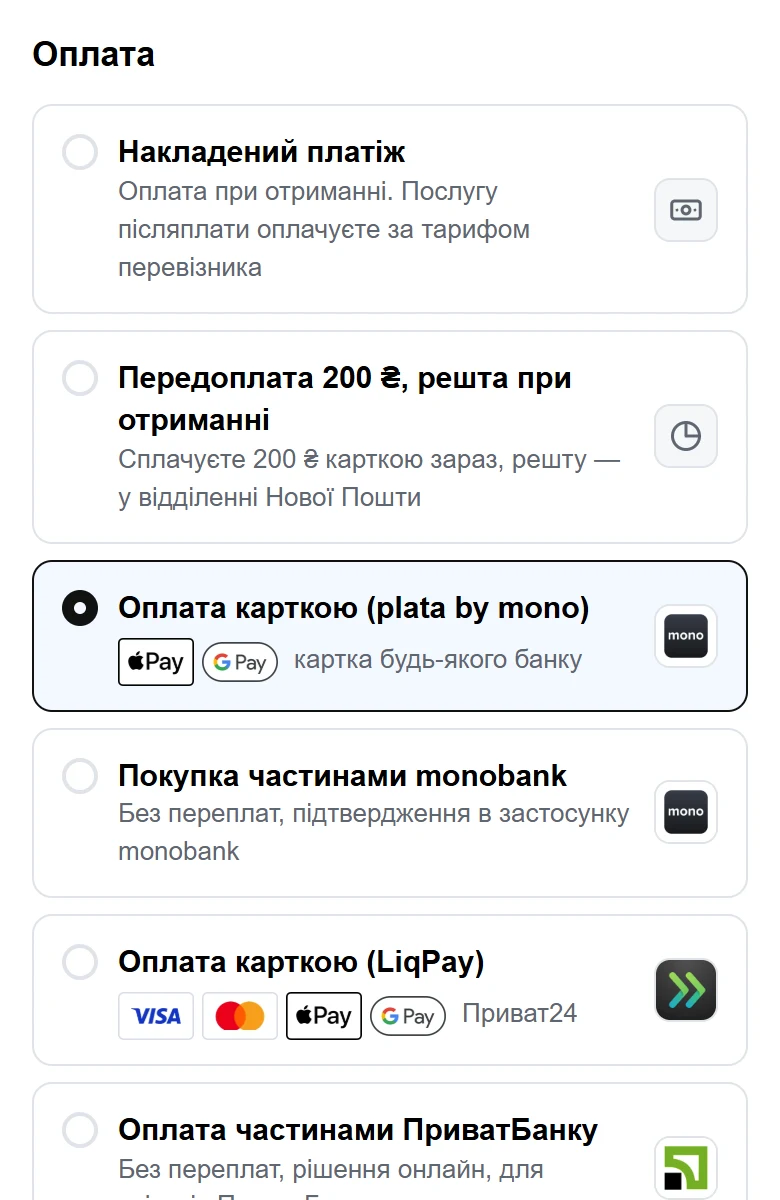
What it looks like
Contacts, delivery, payment and a cart with a promo code and add-on products. Your logo and colours are pulled from your store automatically; Ukrainian, English and Russian versions are available.

Real Nova Poshta branches, the delivery price, all payment methods and the thank-you page. No order is created and no money is charged.
After the order
Orders go straight into ShopifyShopify itself calculates prices, discounts and stock, so nothing goes out of sync. The order appears in your admin with delivery, payment, UTM parameters and tags.
Waybills in one clickNova Poshta and Ukrposhta: a waybill from the dashboard or automatically, a print-ready label, and the number and tracking in Shopify. You also find out automatically when a parcel is refused.
Checkbox and Vchasno.Kasa receiptsA fiscal receipt (PRRO) for every card payment, issued automatically, with delivery as a separate line.
Telegram bot for the ownerNew orders, payment problems, a daily summary and an emergency switch-off button.




KeyCRM, SalesDrive, TurboSMS, AlphaSMS, plus Klaviyo, SendPulse and MailerLite for buyers who agreed to receive mailings.
More sales
Recommended products right on the checkout page, added with a single tap.
Who started and didn’t finish, with their phone number and cart. CSV export. On Pro, a Viber or SMS reminder to those who agreed, linking back to the same cart.
A ready-made cart for social media and messengers: the customer lands straight on checkout.
Meta Pixel and Conversions API, GA4, Google Ads, TikTok, GTM and Clarity. Purchases are sent from the server as well.



Cash on delivery is switched off automatically for buyers who didn’t pick up their parcels.
A returning buyer’s name, city and branch are filled in automatically.
On request
UA Checkout doesn’t have these yet, but we connect them for your store for free: you don’t pay for building the integration. We agree the timeline after checking access to the service’s API; the service’s own fees apply at its rates. Ask with the button in the dashboard or on Telegram.
 PayPalon request
 Sense Bankon request
 Raiffeisen Bankon request
 Meeston request
 Uklonon request
 FedExon request
 DHL Expresson request
Reliability
Shopify checkout.Telegram.Shopify’s standard checkoutAutomatically, sales don’t stopWithout replacing the checkout
Buyers place orders in the standard Shopify checkout, and UA Checkout takes care of what happens after the order.
Telegram bot, to KeyCRM or SalesDrive, and an SMS or Viber message to the buyer.Checkbox or Vchasno.Kasa for paid orders.Nova Poshta waybills from the dashboard or automatically, with tracking in Shopify. We read the branch from the address the buyer typed: “Відділення №5”, “Поштомат 21345” or just a number. If that fails, the order is flagged and no waybill is created by guesswork.Available on Pro and during the 14-day trial. Only our checkout shows the branch list and the real delivery price while ordering, so in this mode change the address field label in Shopify, for example to “Номер відділення НП або адреса” (Nova Poshta branch number or address). You can switch our checkout on any time in the same dashboard.
Setup
With  Google, Apple or email. Confirm that you have read the terms.
Connect ShopifyCreate an app in Shopify by following the step-by-step guide and paste two keys. The script installs into your theme by itself.
~10 minutesAdd your Nova Poshta key and your payment service key, check a test order and turn the checkout on.
Want us to set it up together with you? Message us on Telegram — it’s free.
Pricing
For the first 14 days after you connect, everything works as on Pro, with no payment and no card.
0 ₴/ month
To get started and for small stores
After 30 orders, buyers see the standard Shopify checkout until the 1st of the month.
790 ₴/ month per store
For growing stores
Paid monthly by card via LiqPay.
For comparison: at a turnover of 300,000 ₴ a month, a 1% fee on sales comes to 3,000 ₴. On Pro the price is fixed: 790 ₴. Detailed comparison with Chekly and Plata →
For agencies and freelancers
Do you build stores on Shopify? Recommend UA Checkout to your clients and get 20% of every Pro payment from each account you refer, for 12 months. Your personal link is in the “Partners” section of the dashboard.
Questions
About 15 minutes: sign-up, a Shopify app created from the step-by-step guide in the dashboard, then your delivery and payment keys. No developer needed. If it’s easier, we’ll set it up together with you on Telegram.
Straight to your account with monobank, LiqPay or whichever other service you have a contract with. UA Checkout does not receive or hold buyers’ money and never sees card data.
Yes. Shopify calculates prices, discounts and stock itself, and the finished order appears in your admin with delivery, payment method and tags. Buyers enter promo codes on the checkout page.
Buyers automatically land in the standard Shopify checkout, so sales don’t stop. You can switch our checkout off with one click in the dashboard or with a button in the Telegram bot.
The Shopify rules (API Terms, section 2.3.18) do not allow processing payments and orders outside Shopify Checkout without Shopify’s separate permission. Similar services for Ukrainian stores have worked this way for years, but Shopify may restrict such integrations. We say so plainly when you connect, and we reduce the risk: by default only cash on delivery is enabled, and if anything goes wrong, buyers land in the standard checkout.
Yes, on Pro and during the trial. Turn on “Assistant for Shopify’s standard checkout” in the dashboard: buyers order in the standard Shopify checkout, and you get Telegram notifications, CRM, SMS, receipts and Nova Poshta waybills. We read the branch from the address the buyer typed. This mode has no branch list and no real delivery price while ordering: only our checkout provides those.
For the list of branches and the delivery price, the API key from your Nova Poshta account is enough. To create waybills from the UA Checkout dashboard, enter the number of the branch you ship from.
The script installs into your theme automatically and intercepts the “Check out” and “Buy it now” buttons. If something doesn’t work as expected in your theme, we’ll sort it out together, and until then buyers simply use the standard checkout.
The checkout page always opens in Ukrainian. The buyer can switch it to English, and you turn on Russian in your store settings. The dashboard, the Telegram bot and this site are available in Ukrainian, English and Russian.
In the dashboard, under “Plan”. Pro stays active until the end of the paid month, then the store moves to the Free plan.
14 days of all Pro features, free. No card, no percentage of sales.