Integrations · Messaging
TurboSMS for Shopify in Ukraine
TurboSMS for a Shopify store: a message to the buyer after the order, Viber first and SMS if it is not delivered. On Pro, a reminder to buyers who didn't finish checking out.
What works
- Your own text with the order number, store name and total.
- Viber first, SMS if it is not delivered.
- On Pro: one reminder to a buyer who agreed and didn't finish, with a link back to the same cart.
How to connect
- 1
 Connect Shopify
Sign up for UA Checkout and connect your store following the guide (about 10 minutes), or we connect it for you.
- 2
Get the keys
The token: turbosms.ua → API settings; the SMS and Viber sender names must be approved in TurboSMS.
- 3
Turn it on
UA Checkout dashboard → the store's “Settings” → the “Receipts, CRM, SMS” tab → TurboSMS → “Configure”: paste the details and save; the integration turns on. Place a test order with your own number and the message comes to you.
Step-by-step guide
-
1Connect your Shopify store
Sign up at app.ua-checkout.com and connect your store with the step-by-step wizard (10–15 minutes), or leave a “We'll connect it for you” request and the team does it.
-
2Get the token and approved sender names
turbosms.ua → API settings → token. The SMS sender name (and the Viber one, if you want Viber) must be approved in TurboSMS.
-
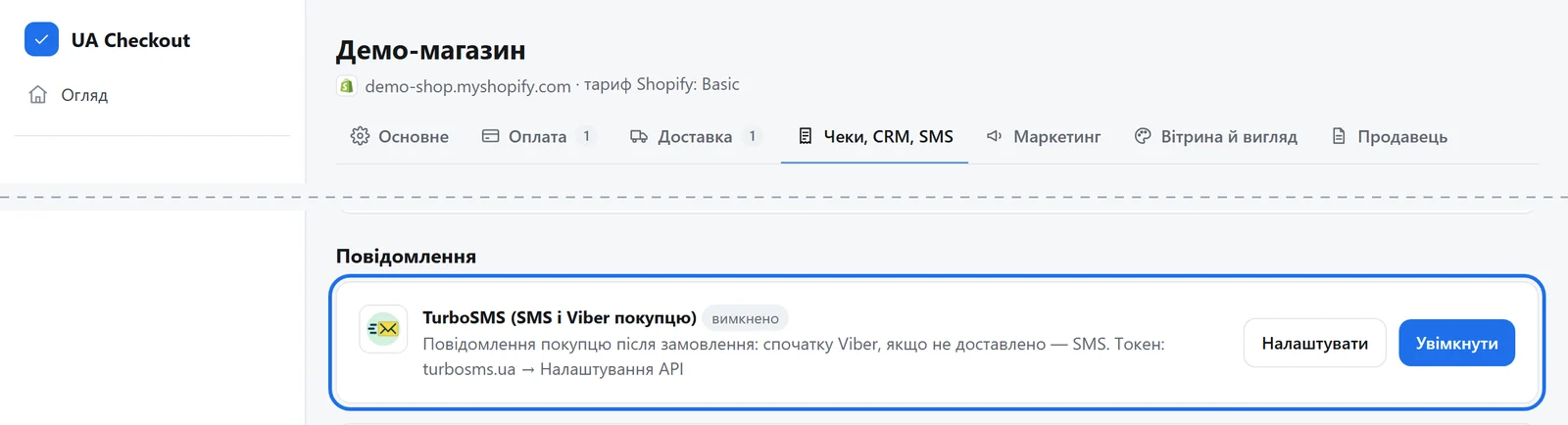
3Open the “Receipts, CRM, SMS” tab
UA Checkout dashboard → the store's “Settings” → the “Receipts, CRM, SMS” tab → the “TurboSMS (SMS and Viber to the buyer)” card → “Configure”.
-
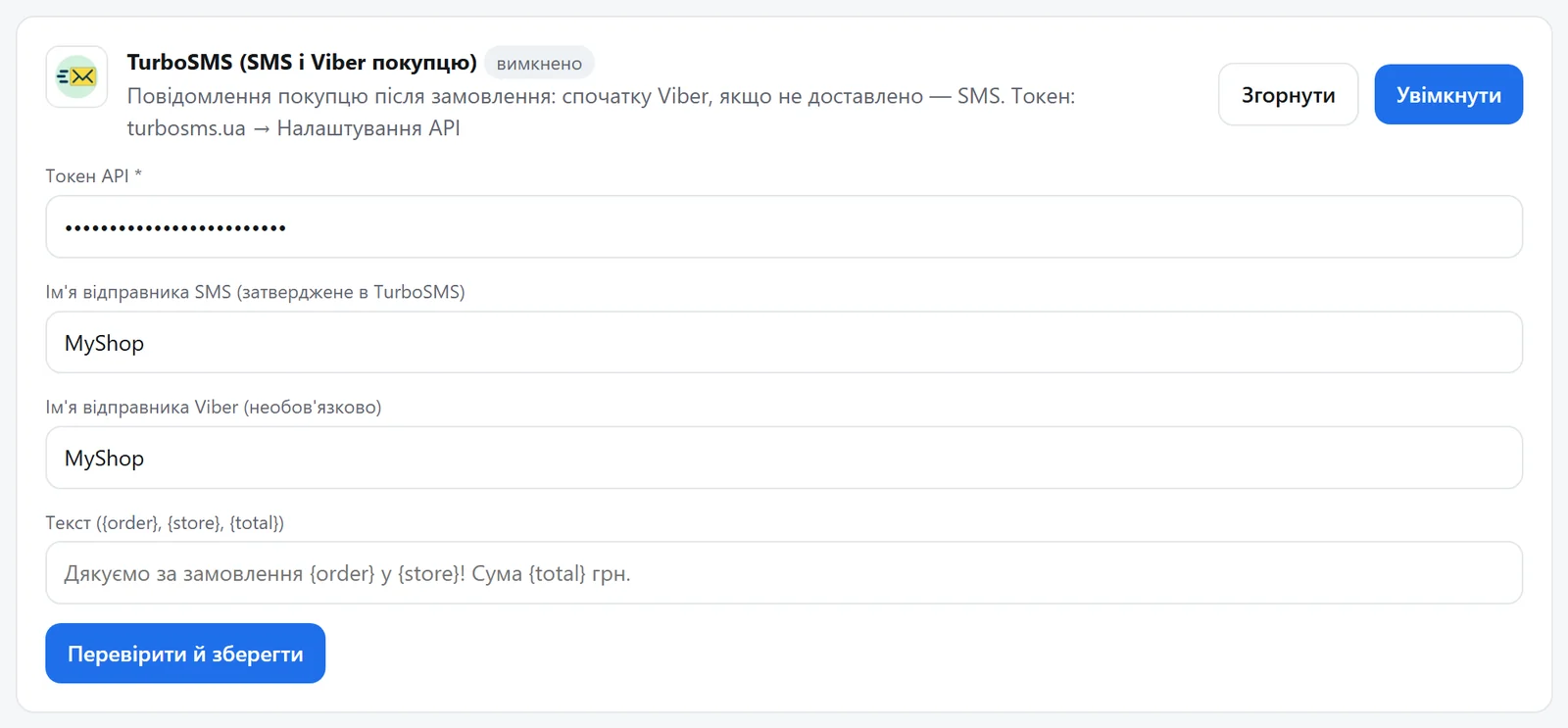
4Paste the token and the message text
The API token, the SMS sender name, optionally the Viber sender name, and your text: {order} is the order number, {store} the store name, {total} the amount. Press “Verify and save”: UA Checkout checks the token with TurboSMS and turns the messages on.
-
5Check with a test order
Place an order with your own number: Viber comes first (if you set a Viber name), and SMS if Viber is not delivered. On Pro you can also turn on the “Abandoned checkout reminder” card on the “Marketing” tab: one reminder to a buyer who agreed and didn't finish.
Questions
Do I need a developer?
No. You paste the keys in the UA Checkout dashboard and the Shopify theme usually stays untouched. If you prefer, we connect it for free.
How much does it cost?
UA Checkout: free up to 30 orders a month, then Pro at 790 ₴ a month, with no percentage of sales. The first 14 days of Pro are free.
TurboSMS in your checkout today
We'll set it up together with you for free. Message us on Telegram