Shopify Payments doesn't work with Ukrainian companies, and the standard Shopify Checkout has neither Nova Poshta branch selection, nor cash on delivery, nor Ukrainian card payment providers. So store owners look for a third-party solution — and immediately run into the question: does Shopify actually allow this?
This article doesn't replace legal advice. It simply explains the three technically different paths Ukrainian Shopify stores use to solve this problem, what Shopify itself says about each of them, and where UA Checkout fits in — so you can weigh the risk yourself.
What Shopify says about payment and orders outside the standard checkout
Shopify's API License and Terms of Use (clause 2.3.18) and Terms of Service (1.8, 4.5) don't allow processing payments and orders outside Shopify Checkout without Shopify's written permission. This is a general platform rule, not something aimed specifically at Ukrainian stores: it concerns where payment and order recording physically happen, not the checkout's language or currency.
Similar services for Ukrainian stores have been working under this model for years, but Shopify can restrict such integrations — it's worth understanding this in advance rather than finding out after the fact.
Three paths stores use to solve this problem
In practice there are three different technical approaches, and they relate to the rules above in different ways.
1. A payment app inside the standard Shopify Checkout
Shopify has an official Payment Apps API: it lets a third-party payment provider connect directly to the standard Shopify Checkout, and the buyer never leaves the Shopify page. Shopify explicitly allows this path.
TradeMinister works exactly this way: a payment app for plata by mono and other providers inside Shopify's checkout. It covers only payment, not delivery selection in the checkout. According to its website, connecting it costs UAH 17,625 as a one-off fee, plus 2.65–4.75% of turnover afterwards — this figure is made up of Shopify's third-party provider fee (0.6–2% depending on the Shopify plan), a 0.4% developer fee, Shopify's 0.35% platform fee and monobank's 1.3% fee (2% for foreign cards). There's also a cheaper option from UAH 8,800 that works via the thank-you page — this may well be the mechanism affected by the change described below; before choosing, check with TradeMinister exactly how this plan works.
2. An external checkout page instead of the standard Shopify Checkout
Here the “Check out” and “Buy it now” buttons lead not to the standard Shopify page but to a separate provider page that brings together Nova Poshta, cash on delivery, Ukrainian card payment providers and Pay in parts. Shopify still calculates prices, discounts and stock levels, but the payment step itself and order recording happen outside the standard Shopify Checkout — this is exactly the situation for which clauses 2.3.18, 1.8 and 4.5 require Shopify's written permission.
UA Checkout, Chekly and GetCheckout are examples of this approach, and each describes its own payment model: UA Checkout has a free plan for up to 30 orders a month and a Pro plan at UAH 790 a month with no order limit and no sales commission (as of October 2026, the first 14 days of Pro are free, no card required); Chekly charges 15 or 60 US dollars a month plus 1% of every successful order, with a 7-day trial; GetCheckout charges 15 US dollars a month for up to 100 orders, 45 dollars for up to 1,000, and 60 dollars above that, with no transaction fee, a 14-day trial and no free plan.
3. Scripts on the Thank you page
Some solutions added delivery selection or payment after the standard Shopify checkout step — via scripts on the Thank you or Order status pages. On 26 August 2026, Shopify disabled additional scripts and script tags on these pages for stores outside Shopify Plus (for Plus stores this happened a year earlier). Anything built on this mechanism stopped working for these stores.
This doesn't affect UA Checkout: it's installed as a snippet in the store's theme and redirects the buyer before the standard Shopify checkout step, not after it.
Comparing the three approaches
| Approach | What it covers | Compliance with Shopify's rules | Approximate cost |
|---|---|---|---|
| Payment Apps API (e.g., TradeMinister) | payment only, delivery stays in Shopify | explicitly allowed by Shopify | UAH 17,625 one-off + 2.65–4.75% of turnover, or from UAH 8,800 (thank-you-page option, check details with TradeMinister) |
| External checkout page (UA Checkout, Chekly, GetCheckout) | delivery and payment together, replacing the standard Shopify Checkout | requires Shopify's written permission under 2.3.18, 1.8, 4.5 | UA Checkout — free up to 30 orders/month or UAH 790/month; Chekly — $15 or $60/month + 1%; GetCheckout — $15–60/month |
| Scripts on the Thank you page | payment or delivery after the standard Shopify checkout | Shopify disabled part of these solutions on 26 Aug 2026 for stores outside Shopify Plus | depends on the provider; check with the provider about the status of a specific solution after 26 Aug 2026 |
How UA Checkout reduces the risk of the second path
UA Checkout states this rule openly during setup, rather than keeping quiet about it. Here's how this is implemented in practice:
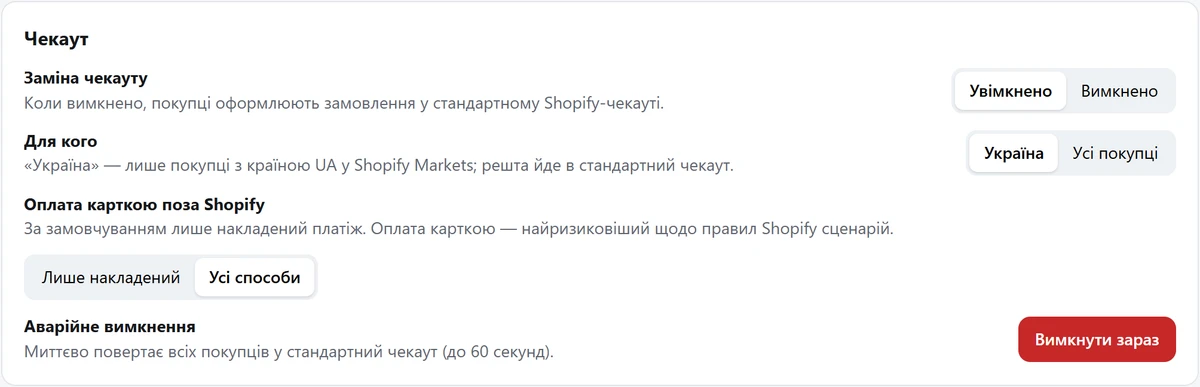
- only cash on delivery is enabled by default, and the store owner switches on card payment outside Shopify themselves, when ready;
- if UA Checkout suddenly becomes unavailable, buyers automatically get the standard Shopify checkout — sales don't stop;
- the dashboard and the Telegram bot both have a one-click emergency off switch.
For stores that want to avoid this question altogether, there's another mode — «Помічник для стандартного чекауту Shopify» (Assistant for the standard Shopify Checkout) (available on the Pro plan and during the trial). Buyers place orders through the standard Shopify Checkout as usual, and UA Checkout then adds owner notifications in Telegram, CRM, SMS or Viber messages to the buyer, fiscal receipts and Nova Poshta waybills (TTN) on top — payments and orders stay within Shopify Checkout, which is exactly the scenario that clauses 2.3.18, 1.8 and 4.5 don't restrict; for a final assessment it's worth consulting a lawyer. It's also worth knowing the limitations: the standard Shopify Checkout has no branch list or real Nova Poshta pricing, so the branch number is read from the address field, and when it isn't recognised, the order is flagged in the dashboard rather than processed blindly.
What to do right now if you're choosing a checkout
- Determine exactly what's missing: just payment, or delivery with branch selection too.
- If payment alone is enough, look at a solution via the Payment Apps API that leaves delivery in Shopify.
- If you need delivery and payment together, open the UA Checkout demo without connecting your store.
- If you're switching from another checkout, use test mode: the current checkout stays live for everyone, and the button leading to UA Checkout only appears via a special link.
- Before the final switch, check that the automatic fallback to the standard checkout and the emergency off switch actually work.
You can read more about how different solutions for the Ukrainian market are built technically in the overview of Shopify checkouts and in the comparison of UA Checkout with Chekly and Plata. If you want to try it with no commitment, you can register your store with UA Checkout in 15 minutes, and connection questions are handled by support on Telegram.