Owners of online stores on WooCommerce in Ukraine regularly run into the same problem: the standard WordPress checkout doesn't know about Nova Poshta branches, doesn't calculate cash on delivery at the carrier's rates, and doesn't offer the usual Ukrainian card payment methods. Store owners end up either hunting for separate paid plugins for each service, or leaving the buyer with a plain «Адреса доставки» (Delivery address) field that makes no sense for Nova Poshta delivery.
Since October 2026, UA Checkout works not only with Shopify but also with WooCommerce. In this article, we'll go over which stores it suits, the two connection modes available, what cash on delivery and card payment look like for the buyer, how much it costs, and how to connect a store without a developer.
Which WooCommerce stores UA Checkout suits
UA Checkout connects to a WooCommerce store if it meets the technical requirements: WordPress 6.0 or later, WooCommerce 8.0 or later, PHP 7.4 or later, and the site running on HTTPS. The service was tested against exactly these requirements for WooCommerce on 19 October 2026.
The service replaces checkout with a single page that buyers in Ukraine expect: Nova Poshta branches and parcel lockers with the real delivery price before payment, cash on delivery, and Ukrainian card and instalment payment methods. If you're not yet ready to give up the usual WooCommerce checkout, there's a second option — keep it, and connect UA Checkout as «помічник» for notifications, waybills and fiscal receipts.
Two ways to connect UA Checkout to WooCommerce
Choose the mode depending on how ready you are to change your checkout:
- UA Checkout page instead of the WooCommerce checkout. A free plugin for WooCommerce (you can download it at ua-checkout.com/downloads/ua-checkout-woocommerce.zip; it has also been submitted to the WordPress.org directory, and as of 19 October 2026 it's under review) moves the order button to the UA Checkout page. UA Checkout takes the cart, prices, discounts and taxes from WooCommerce, the buyer chooses delivery and payment right on the UA Checkout page, and the finished order with the chosen delivery and payment method is created in WooCommerce.
- Assistant for the WooCommerce checkout. Available on the Pro plan and during the 14-day trial. Buyers place orders through the usual WooCommerce checkout, and UA Checkout steps in afterwards: it sends a Telegram notification to the owner, passes the order to a CRM, sends an SMS or Viber message to the buyer, and creates a fiscal receipt and a Nova Poshta waybill.
| UA Checkout page | Assistant for the WooCommerce checkout | |
|---|---|---|
| Who sees the new page | All of the store's buyers | No one — buyers stay on the WooCommerce checkout |
| Nova Poshta branches | A list of branches and parcel lockers, with price and date before payment | Read from the address field or from the WC Ukr Shipping and morkva UA Shipping plugin fields |
| Payment methods | monobank, LiqPay, Pay in parts, cash on delivery and others from the dashboard | WooCommerce's own payment methods |
| Notifications, CRM, receipts, waybills | Yes | Yes |
| Pro required | No, also works on the free plan | Yes, or the 14-day trial |
How Nova Poshta works in UA Checkout
In checkout-replacement mode, the buyer sees a real list of branches and parcel lockers in the chosen city, plus the price and estimated delivery date before paying — the data comes from the Nova Poshta API using the key and the sending city that the store specified. The price is calculated from the weight of the store's products, the packaging weight and the parcel dimensions, so a light but bulky parcel is priced by volumetric weight — exactly the way Nova Poshta itself does it. The branch list has a «Найближчі до мене» (Nearest to me) button: it shows the 10 nearest points in the chosen city with the distance to each one, and the browser only asks for location access after the button is clicked, without storing it anywhere.
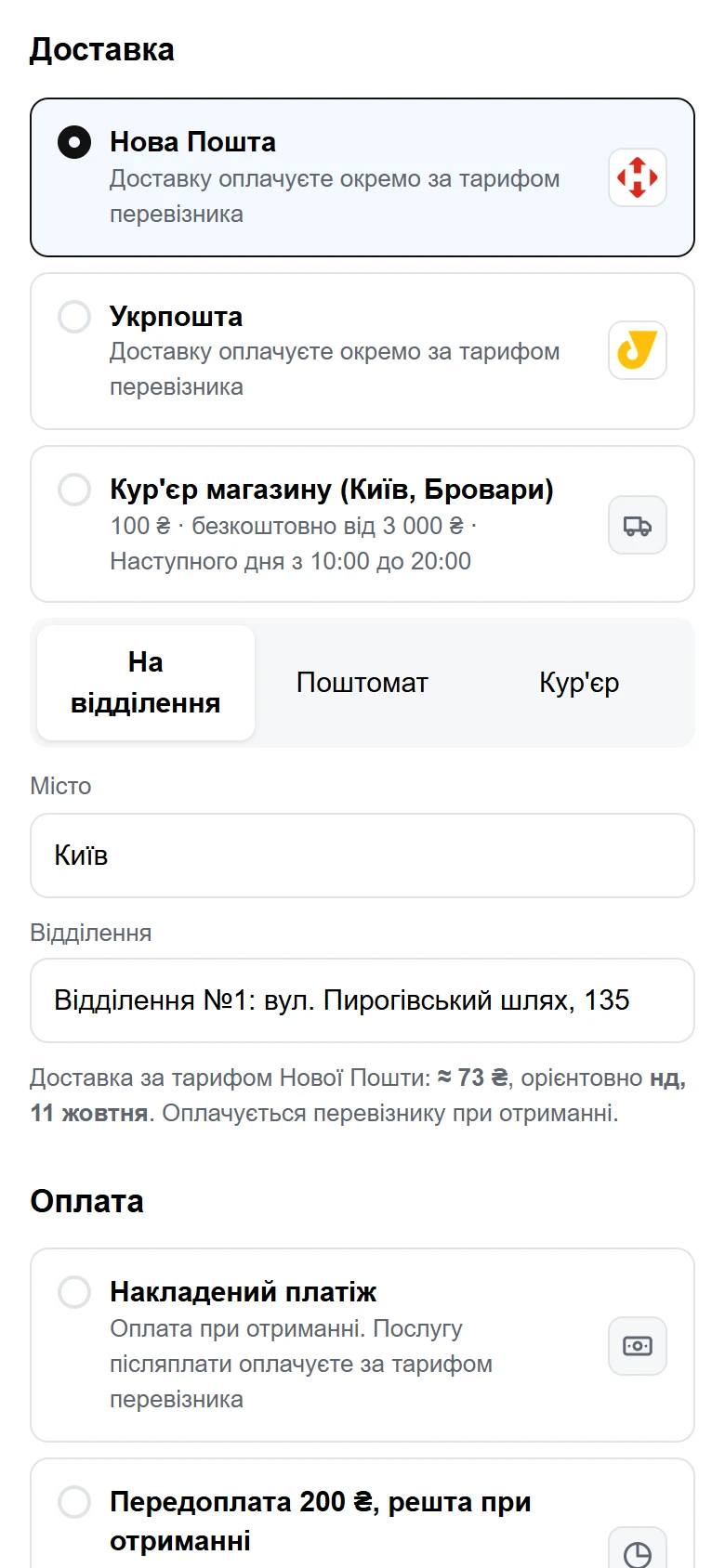
A waybill can be created in the UA Checkout dashboard with one click, or automatically after the order, and the label can be printed. For WooCommerce, the waybill number is added to the order as a note to the buyer, which WooCommerce sends to them by email.
In «помічник» mode, things work differently: UA Checkout doesn't show the buyer a list of branches during checkout — it reads the branch number from the address field that the buyer filled in themselves on the usual WooCommerce checkout, as well as from the WC Ukr Shipping and morkva UA Shipping plugin fields if they're installed. UA Checkout never treats a street address as a branch: if the number isn't recognised, the order is flagged in the dashboard, and no waybill is created at random.
Cash on delivery in WooCommerce: what the buyer sees
Before checking out, the buyer sees an estimated delivery price and an estimated carrier fee for the money transfer — data from the Nova Poshta calculator; the buyer pays both amounts to the carrier on receipt. The waybill is created with the cash-on-delivery amount already included. The buyer can tick «не дзвонити для підтвердження замовлення» (don't call to confirm the order) — the store will see this on the order.
If a buyer refuses a cash-on-delivery parcel, UA Checkout disables cash on delivery for that buyer's phone number — a safeguard against repeat refusals.
Unlike Shopify, where only cash on delivery is enabled by default, in WooCommerce (as in OpenCart and PrestaShop) the store chooses which payment methods to show buyers right from the moment of connection.
Card payment and other payment methods in WooCommerce
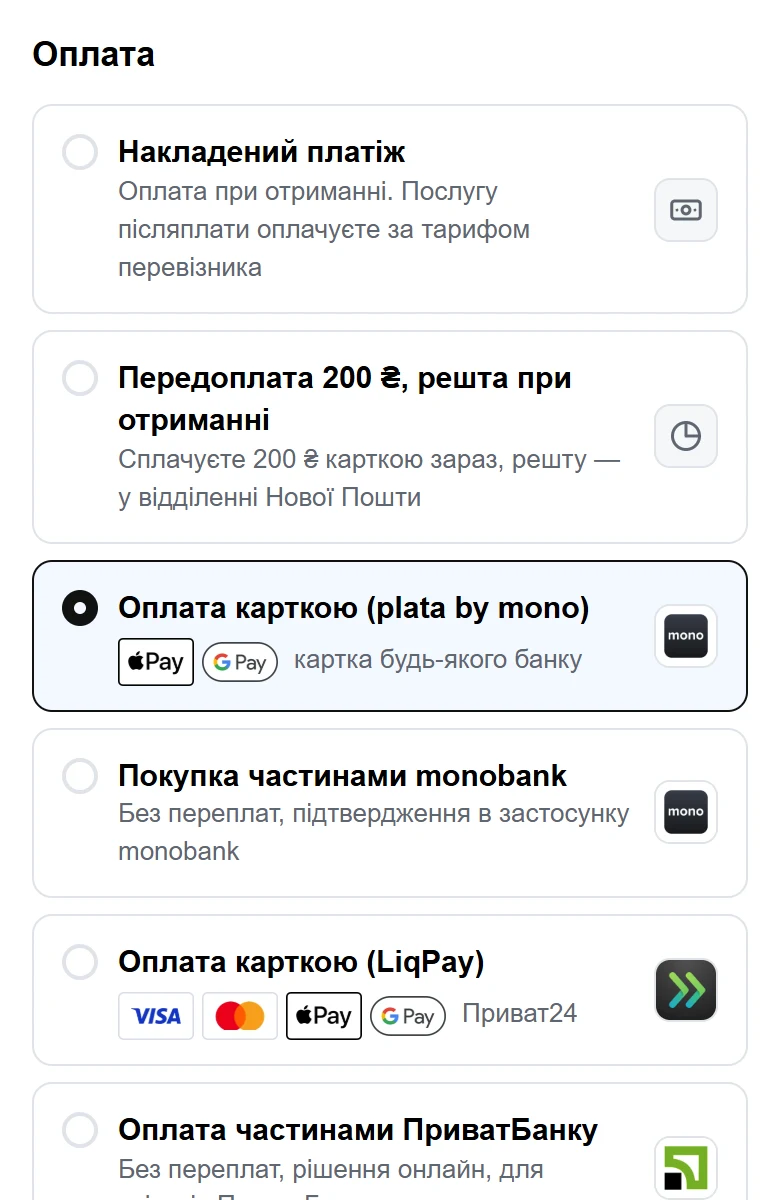
In checkout-replacement mode, the same payment methods are available as in UA Checkout for Shopify:
- monobank acquiring (plata by mono) — card, Apple Pay, Google Pay;
- monobank's «Покупка частинами» (Purchase in parts) — a separate service that's connected in the monobank dashboard and the UA Checkout dashboard;
- LiqPay — card, Apple Pay, Google Pay and Privat24, as well as PrivatBank's “Pay in parts” through the same LiqPay account;
- instalment payments from A-Bank and PUMB via Tranzzo (the store first has to ask Tranzzo support to enable these methods);
- WayForPay, hutko, Fondy, RozetkaPay, Portmone, EasyPay, NovaPay, Tranzzo;
- Stripe — for stores with a Stripe account in a supported country;
- payment by bank details (IBAN), when a manager marks the payment manually.
The money always goes directly to the store's accounts — UA Checkout never receives buyers' funds and never sees card details.
UA Checkout doesn't currently connect PayPal, Sense Bank, Raiffeisen Bank or Splaty — these methods can be obtained “on request,” and the connection timeline is agreed after checking access to the service's API.
How much UA Checkout costs for WooCommerce
As of October 2026, the prices for WooCommerce are the same as for Shopify.
| Plan | Order limit through UA Checkout | Badge on checkout | Price |
|---|---|---|---|
| Free | Up to 30 per calendar month | “Powered by UA Checkout” | UAH 0 |
| Pro | No limit | None | UAH 790/month per store |
| Trial | No limit | None | 14 days free immediately after connecting |
Once the free limit is used up, new buyers are directed to the usual WooCommerce checkout until the 1st of the next month. The «помічник» mode is only available on Pro or during those 14 trial days.
How to connect UA Checkout to WooCommerce
Connecting doesn't require sharing your site password:
- Sign up in the UA Checkout dashboard — via Google, Apple, Telegram, or email and password.
- Download the free UA Checkout plugin for WooCommerce and install it in WordPress.
- In the dashboard, enter your site's address and confirm access directly in WordPress — you don't need to enter a password anywhere.
- Set up the delivery methods (Nova Poshta, pickup and others as needed) and the payment methods you want to show buyers.
- Turn on «Тест» mode — check the checkout in your own browser without showing it to other buyers.
- Once you're happy with everything, enable the UA Checkout page for all of the store's buyers.
Before connecting your own store, you can try the demo checkout yourself — it has real Nova Poshta branches and all the payment methods, but no order is created and no money is charged.
Limitations worth knowing about
- If the UA Checkout page doesn't respond for some reason, the buyer automatically stays on the WooCommerce checkout — sales don't stop.
- In «помічник» mode, UA Checkout doesn't show the buyer the real Nova Poshta price or the list of branches during checkout: the buyer sees all of that on the usual WooCommerce checkout, and UA Checkout only connects after the order is created.
- The features UA Checkout offers on Shopify — payment links, an upsell block at checkout, abandoned-checkout reminders, and the «Конверсія до і після» (Conversion before and after) report — are not yet confirmed for WooCommerce.
- Shopify's rules about placing orders outside the standard checkout only apply to stores on Shopify: WooCommerce is the store's own website, and these restrictions don't apply to it.
If you're comparing several checkout solutions, take a look at the comparison with Chekly and Plata — it has more details on the pricing and features of alternative services. You can register your store at app.ua-checkout.com/register, and support on Telegram can help with any questions during setup.
Frequently asked questions
Can UA Checkout be connected to WooCommerce without a developer? Yes, installing the plugin and connecting it in the dashboard doesn't require any code or your site password — access is confirmed directly in WordPress.
What happens to buyers if UA Checkout is unavailable? They automatically stay on the usual WooCommerce checkout, and orders aren't lost.
Does cash on delivery work through Nova Poshta? Yes, the buyer sees an estimated delivery price and a money-transfer fee before paying, and if the buyer refuses the parcel, cash on delivery is disabled for the buyer's phone number.
Can I keep the usual WooCommerce checkout and just get notifications and waybills? Yes, this is «помічник» mode: available on the Pro plan or during the 14-day trial.
How much does UA Checkout cost for WooCommerce? Free for up to 30 orders per calendar month through UA Checkout, Pro is UAH 790 per month per store with no order limit, with the first 14 days of Pro free (as of October 2026).