If you sell on Shopify to buyers in Ukraine, the standard Shopify Checkout quickly shows its limits: Shopify Payments doesn't serve businesses in Ukraine, there's no Nova Poshta branch selection, no cash on delivery via Nova Poshta, and no Ukrainian card acquirers out of the box. That's why store owners look for a third-party solution — a checkout that either fully replaces this step or complements the standard Shopify checkout with the needed features.
This article is an honest guide to comparing such solutions: which criteria to look at, how much they cost as of October 2026, and what risk is involved in operating outside the standard Shopify Checkout. The tables contain only verified data about UA Checkout and its competitors, without value judgements.
Why the standard Shopify Checkout doesn't work for Ukrainian buyers
Shopify Payments doesn't work with businesses in Ukraine, so a store can't accept cards directly through the standard Shopify checkout. In addition, the standard Shopify checkout has no built-in Nova Poshta branch selection, no cash on delivery via Nova Poshta, and no Ukrainian payment providers. That's why stores selling to Ukraine connect a third-party solution — either fully replacing the checkout or keeping the Shopify checkout and adding the needed features separately.
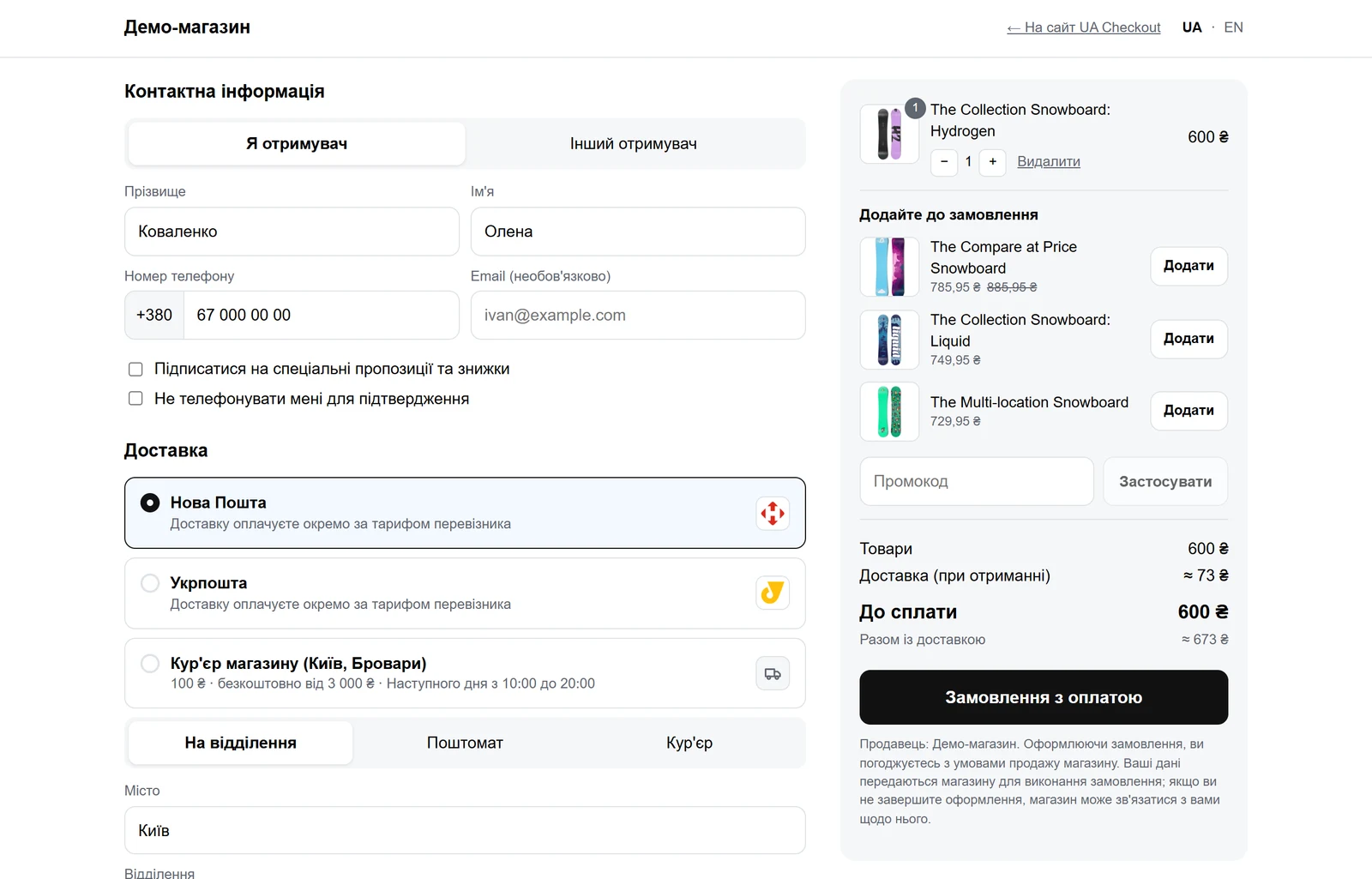
What criteria to use when comparing checkouts for Shopify in Ukraine
- Whether it shows the real Nova Poshta or Ukrposhta delivery cost before payment, rather than an estimated rate.
- Whether cash on delivery is available, along with protection against refusals.
- Which payment methods are supported: card, Apple Pay, Google Pay, instalment payments, Ukrainian banks.
- Whether waybills (TTN) are created from the solution's dashboard, or whether they need to be issued separately by hand.
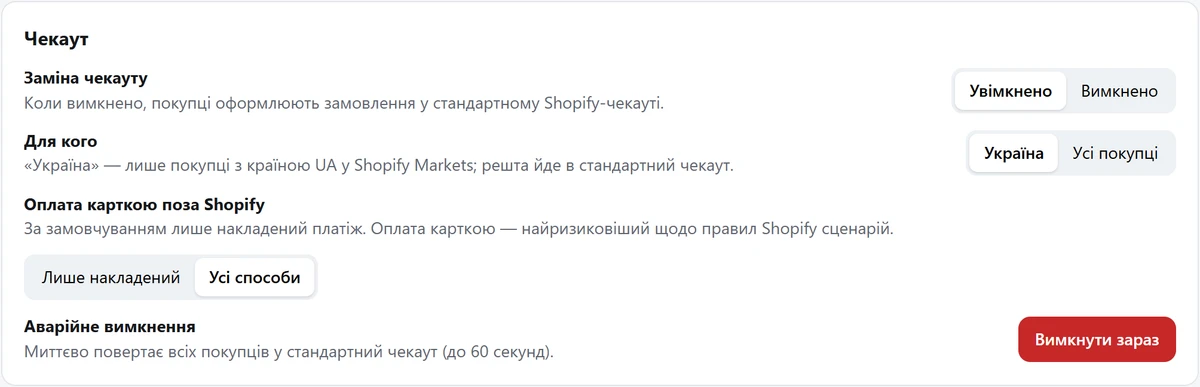
- What happens if the service becomes unavailable: whether there's an automatic fallback to the Shopify checkout.
- Pricing model: a fixed fee or a percentage of every order, and whether there's a free plan or trial.
- Whether payment or delivery selection is processed outside the standard Shopify Checkout — and what rules Shopify imposes on this.
How much a checkout for Shopify costs: UA Checkout, Chekly, Plata and others
Price is only one criterion, but it's a convenient place to start. The data below is as of October 2026.
| Solution | Price, October 2026 | Pricing model | Free start |
|---|---|---|---|
| UA Checkout | Free for up to 30 orders/month; Pro — UAH 790/month | Fixed fee, 0% of sales | 14 days of Pro, no card |
| Chekly | $15 or $60/month + 1% of every successful order | Fixed fee + percentage | 7-day trial |
| Plata | Free plan (monobank, Nova Poshta, cash on delivery) or Growth — UAH 960/month | Fixed fee (in Growth) | Free plan |
There are two more solutions with a different approach. GetCheckout (according to its website, verified on 2026-10-11) charges $15/month for up to 100 orders, $45 for up to 1,000, and $60 for over 1,000 (20% discount for annual payment), with no transaction fee, and offers a 14-day trial with no free plan. TradeMinister doesn't replace the checkout, but connects payment (for example, plata by mono) inside the Shopify checkout itself via the Payment Apps API: a one-time payment of UAH 17,625 and then 2.65–4.75% of turnover (Shopify's plan fee of 0.6–2%, a developer fee of 0.4%, Shopify's platform fee of 0.35%, and monobank's fee of 1.3% or 2% for foreign cards); there's a cheaper option on the thank-you page starting at UAH 8,800. This covers payment only: TradeMinister doesn't cover delivery method selection in the checkout.
According to its own website, Chekly also has Vchasno.Kasa, FedEx, Uklon, A-Bank, Splaty, and instalment payments with PUMB.
Delivery and cash on delivery: what to pay attention to
The buyer should see the real Nova Poshta delivery cost and an estimated date before payment — this reduces surprises and returns. In UA Checkout, the price is calculated via the Nova Poshta API using the store's key and sender city, taking into account the weight of the products in Shopify, the packaging weight, and the parcel size based on the store's standard box or the product's size field, so a light but bulky parcel is assessed by volumetric weight — just as Nova Poshta itself does. For more on setting this up, see the guide to Nova Poshta in Shopify.
According to their websites (verified in October 2026), Chekly and Plata do not state a delivery cost before payment, waybill creation from the dashboard, a Telegram bot, protection against refusals, or an automatic fallback to the standard Shopify checkout. This doesn't mean these features don't exist — only that there's no information about them on the websites.
In UA Checkout, waybills for Nova Poshta and Ukrposhta are created from the dashboard with one click or automatically after an order, the waybill number is added to the Shopify order, and if a buyer refuses a parcel, cash on delivery for that phone number is switched off automatically.
Which payment methods a checkout for Shopify in Ukraine supports
Besides cash on delivery, Ukrainian buyers expect card payment, Apple Pay, Google Pay, and instalment payments. In UA Checkout, these are: monobank (plata by mono — card, Apple Pay, Google Pay) and separately monobank's “Purchase in parts”; LiqPay from PrivatBank (card, Apple Pay, Google Pay, Privat24, and PrivatBank's “Pay in parts” on the LiqPay page); instalment payments from A-Bank (from UAH 300) and PUMB (PUMB cards only, from UAH 500) via Tranzzo; as well as WayForPay, hutko, Fondy, RozetkaPay, Portmone, EasyPay, NovaPay, and Tranzzo. PayPal, Sense Bank, Raiffeisen Bank, Splaty, and recurring payments are available on request: UA Checkout connects them for a specific store after checking access to the service's API, with the timeline agreed separately.
In all cases, the money goes directly to the store's accounts: UA Checkout doesn't receive or see buyers' card details. For more on cash on delivery and reducing refusals, see the separate guide.
Does Shopify allow processing orders outside the standard checkout
Shopify's rules — the API License and Terms of Use (clause 2.3.18) and the Terms of Service (clauses 1.8 and 4.5) — don't allow processing payment and orders outside the Shopify Checkout without Shopify's written permission. Similar services for Ukrainian stores have operated this way for years, but Shopify may restrict such integrations. UA Checkout informs about this when connecting and reduces the risk: by default, only cash on delivery is enabled, the store owner enables card payment methods outside Shopify themselves, and if the service becomes unavailable, buyers automatically get the standard Shopify checkout — sales don't stop.
On 26 August 2026, Shopify disabled additional scripts and script tags on the Thank you and Order status pages for stores outside Shopify Plus (for Plus stores, this happened a year earlier). This affected solutions that handled payment or delivery selection with scripts specifically on the thank-you page. UA Checkout wasn't affected: the script is installed in the store's theme and runs before the standard Shopify checkout, not on the thank-you page. TradeMinister takes a different approach: it connects payment apps inside the Shopify checkout itself via the Payment Apps API, which Shopify explicitly allows — but this only covers payment, without delivery method selection.
How to start without risk: test mode and “Assistant” mode
Test mode: the store keeps its current checkout (for example, Chekly) for all buyers, and the UA Checkout button only appears to those who open the store via a special link — this way the solution can be tested on a live store before switching. If the order of order fields matters for exchange with 1C, a CRM, or a script built for Chekly, UA Checkout can add the same order fields as Chekly (recipient name, delivery method, city, branch, payment, and others).
“Assistant” mode: if you're not ready to replace the Shopify checkout entirely, you can keep the standard checkout for buyers and enable «Помічник для стандартного чекауту Shopify» (Assistant for the standard Shopify checkout) in the dashboard (available on Pro and during the 14-day trial). Then orders placed in the Shopify checkout get an owner notification in Telegram, transfer to KeyCRM or SalesDrive, an SMS or Viber message to the buyer, Checkbox or Vchasno.Kasa receipts for paid orders, and Nova Poshta waybills from the dashboard or automatically. Limitation: there's no branch list, real Nova Poshta price, or UA Checkout payment methods during checkout itself — the buyer sees the delivery rates and payment methods configured in Shopify. Such orders don't count toward the free plan's limit of 30 orders.
Which solution to choose for your store
There's no universal answer — it all depends on your order volume and how much you're willing to pay. If you have few orders, it makes sense to start with a free plan: UA Checkout offers up to 30 orders a month with all payment methods, delivery options and integrations, except reminders for incomplete orders; Plata is free, but limited to monobank, Nova Poshta, and cash on delivery. If you have more orders and a fixed fee with no percentage of sales matters to you, compare UA Checkout Pro (UAH 790 a month, 0% of sales) with Chekly (a percentage of every order) or GetCheckout (a fee based on order volume range, with no transaction fee). If it's enough to connect just the payment, and the delivery method in the standard Shopify checkout already suits you, it's worth looking at TradeMinister with its approach via the Payment Apps API.
You can see what this looks like from the buyer's side in the UA Checkout demo: real Nova Poshta branches and delivery cost, all payment methods, with no order placed and no money charged. A more detailed comparison of UA Checkout with Chekly and Plata is on the comparison page. Connecting is free, registration takes a few minutes, and the first 14 days of Pro are available with no card required.