Cash on delivery is still the usual way to pay for many Ukrainian buyers: order, collect at the branch, inspect the parcel and pay. Shopify has a “Cash on Delivery” payment method, but it knows nothing about Nova Poshta. Here is how to make cash on delivery in Shopify work properly and how to cut the number of parcels that come back.
What is wrong with Shopify's standard “Cash on Delivery”
Shopify lets you add a manual payment method called “Cash on Delivery (COD)”. The order is simply created as unpaid. That is where the support ends:
- the buyer does not choose a Nova Poshta branch from a list — they type the address as text;
- they cannot see what delivery and the money transfer will cost, so the amount due on receipt comes as a surprise;
- the manager creates the waybill (TTN) with the cash on delivery amount by hand in the Nova Poshta dashboard;
- there is no protection against buyers who have already refused parcels.
These are the steps where calls, mistakes and refusals appear.
How cash on delivery works in UA Checkout
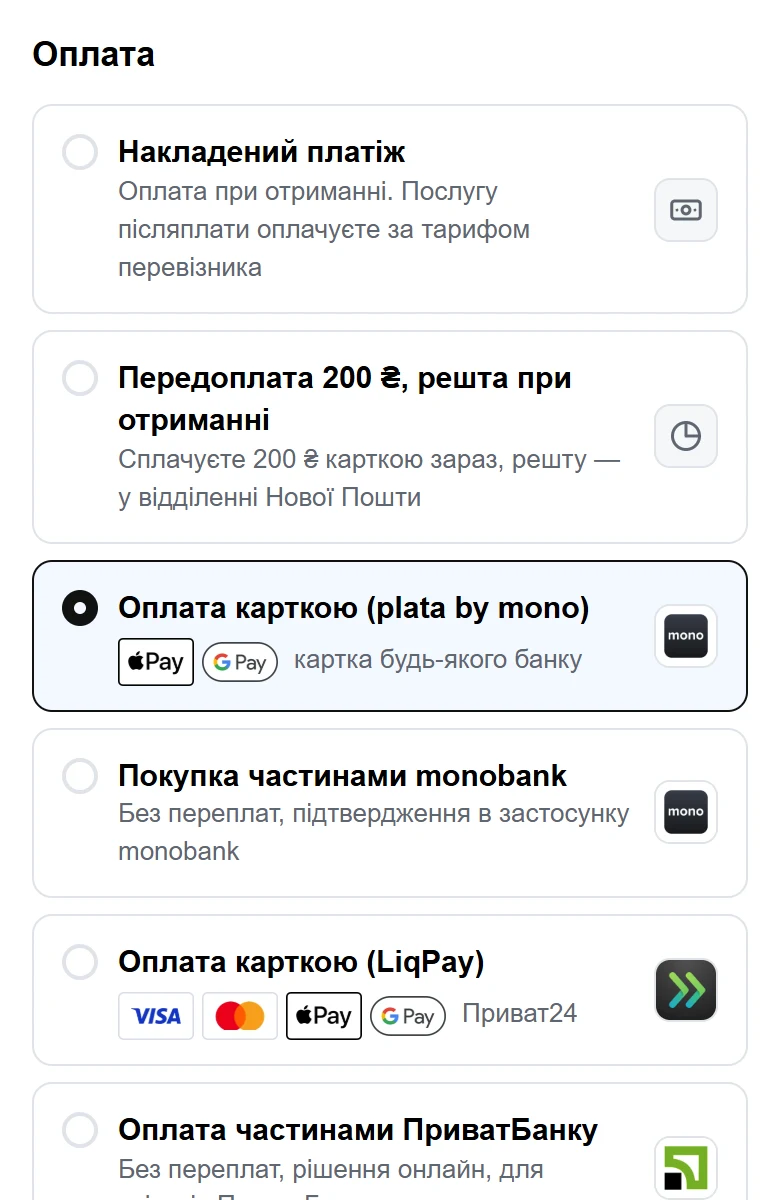
On the UA Checkout page, cash on delivery is one of the payment methods alongside monobank, LiqPay and others:
- The buyer picks a city and a Nova Poshta branch or parcel locker from a list.
- Before ordering, they see the estimated delivery price and the carrier's fee for the money transfer — both calculated by Nova Poshta's calculator and paid on receipt.
- The order appears in the Shopify admin straight away, with the delivery, payment method and tags.
- You create the waybill from the UA Checkout dashboard with one click or automatically — the cash on delivery amount is already in it.
In a new store, cash on delivery is exactly what is switched on by default: you turn on card payments outside Shopify separately, when you are ready.
How to reduce parcel refusals
| Tool | How it works | What it gives |
|---|---|---|
| Partial prepayment | The buyer pays part by card now (for example, 200 UAH) and the rest on receipt. Prepayment can be optional or mandatory | Someone who has already paid is less likely to leave the parcel at the branch |
| Refusal protection | If a buyer does not collect a cash-on-delivery parcel, cash on delivery is switched off for their phone number | Repeat refusals from the same people stop |
| Price before payment | Delivery and the transfer fee are shown already on the checkout page | Fewer refusals caused by “I didn't know I'd have to pay that much” |
| Confirmation without a call | The buyer can tick “don't call to confirm”, and the message arrives via TurboSMS or AlphaSMS | Fewer missed calls and lost orders |
| Telegram notifications | New orders and problems go straight to your chat | Faster dispatch — less time to change their mind |
The strongest tool is partial prepayment: it turns “just ordered” into “already paid”, while a buyer who is uncomfortable paying everything up front still gets the familiar pay-on-receipt option.
How to turn on cash on delivery in Shopify with UA Checkout
- Sign up in the UA Checkout dashboard and connect your store using the step-by-step instructions — it takes about 15 minutes and no developer.
- Add your Nova Poshta API key and dispatch city — this brings in branches, the delivery price and the transfer fee. How to do it is described in the article on Nova Poshta in Shopify.
- In the payment section, open “Cash on delivery” and, if you wish, set the partial prepayment amount and whether it is mandatory. Prepayment requires card payment — for example, monobank or LiqPay.
- Check the checkout in the live demo or on your own store and turn on the checkout replacement.
How much it costs
UA Checkout takes no percentage of sales. Up to 30 orders a month are free with all payment methods; after that, the Pro plan costs 790 UAH a month. The buyer pays Nova Poshta for delivery and the money transfer fee at the carrier's tariffs — the checkout page shows them in advance. For a comparison with other services, see the comparison with Chekly and Plata page.
A short note on Shopify's rules
Processing payments outside Shopify Checkout formally goes against Shopify's rules (API Terms, section 2.3.18), and Shopify may restrict such integrations. Similar services for Ukrainian stores have worked for years; UA Checkout warns about this openly when you connect, turns on only cash on delivery by default, and automatically sends buyers back to the standard checkout if the service is unavailable.