Shopify is a convenient platform for a brand, but its standard checkout was built for a world where parcels go to a home address. Ukrainian buyers are used to something different: pick a city and a Nova Poshta branch or parcel locker, and see straight away what delivery will cost. Below: why this is missing out of the box, what the options are, and how to connect Nova Poshta to Shopify in about 15 minutes without a developer.
Why Shopify has no Nova Poshta out of the box
Shopify's standard checkout is the same for every country. It asks for the address as free text and calculates shipping by zones that the store sets up. There is no list of branches and parcel lockers and no real carrier price, so buyers type “NP 25” into the address field or a comment, and a manager then has to call back to clarify.
On most Shopify plans apps cannot change the fields of the checkout itself: checkout extensions are available only on Shopify Plus. So Ukrainian stores either put up with manual work or move checkout to a separate page that already knows how to work with Nova Poshta.
Three ways to add Nova Poshta
| Method | What the buyer sees | Delivery price before payment | Waybill (TTN) | Manual work |
|---|---|---|---|---|
| Address or comment in the standard checkout | An empty field; the buyer types the branch by hand | No | Manually in the Nova Poshta dashboard | Clarification calls, wrong branches |
| A Shopify app that does not change the checkout | The same address field | Depends on the Shopify plan and the app | Often from the admin | Less, but the branch is still typed as text |
| A separate checkout page (for example, UA Checkout) | City search, a list of branches and parcel lockers, courier | Yes, plus an estimated date | From the dashboard in one click or automatically | Minimal |
The first two methods are fine if you have few orders. When there are dozens a day, the difference between “picked a branch from the list” and “wrote something in a comment” shows up in every call a manager makes.
What the buyer sees
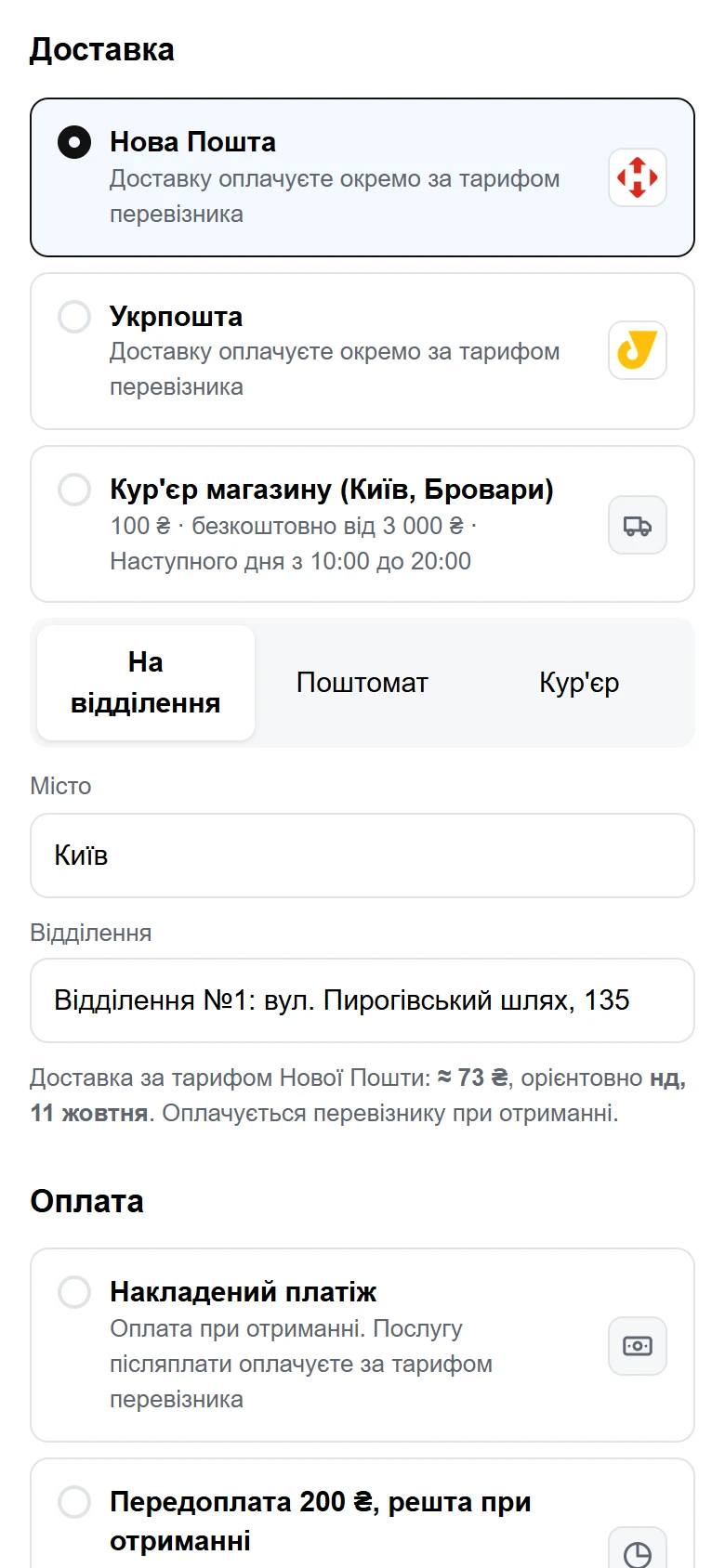
On the UA Checkout page the buyer:
- chooses a branch, parcel locker or courier to an address (with street search);
- searches for a city by typing a few letters, and popular cities are one tap away;
- sees the delivery price and an estimated date before paying — they come from the Nova Poshta API using your key and your dispatch city;
- gets name, city and branch already filled in on a repeat purchase.
Buyers who choose Ukrposhta, pickup or the store's own courier see those options on the same page. You can try it in the live demo: the branches are real, but no order is created.
How to connect Nova Poshta to Shopify in 15 minutes
- Sign up in the UA Checkout dashboard. The Pro plan is free for the first 14 days, with no card required.
- Connect your store. The dashboard has step-by-step instructions: create an app in the Shopify Dev Dashboard and paste its Client ID and Client Secret. The theme script is installed automatically.
- Add your Nova Poshta key. In your Nova Poshta dashboard open «Налаштування» → «Безпека» → «Ключі API» (Settings → Security → API keys), copy the key and paste it into UA Checkout together with your dispatch city.
- Set up waybills (optional). Enter the number of the branch you ship from and, if you wish, turn on automatic creation of waybills straight after an order.
- Choose payment methods. Cash on delivery is on by default; you turn on card payments through monobank, LiqPay and other services separately.
- Test and switch on. Go through checkout as a buyer and turn on the checkout replacement. You can apply it to buyers from Ukraine only and leave everyone else on the standard Shopify checkout.
If something doesn't work, write to Telegram support — we'll connect it together, free of charge.
Waybills and tracking without manual work
After an order, a Nova Poshta waybill can be created from the UA Checkout dashboard with one click or automatically. The label can be printed, and the waybill number and tracking go into the Shopify order, so the buyer receives them in the store's usual email.
For cash-on-delivery orders, the waybill is created straight away with the cash on delivery amount. And if a buyer doesn't collect the parcel, UA Checkout records the refusal and switches off cash on delivery for that phone number in future orders. More in the article on cash on delivery in Shopify.
How much it costs
- Free — up to 30 orders a month through UA Checkout, with all delivery and payment methods and the “Powered by UA Checkout” badge.
- Pro — 790 UAH a month per store: no order limit, no badge and no percentage of sales.
- The buyer pays Nova Poshta for delivery at the carrier's tariff, unless the store decides otherwise.
You can compare UA Checkout with other solutions for Shopify in Ukraine on the comparison with Chekly and Plata page.
What to know before connecting
Shopify's rules (API Terms, section 2.3.18) do not allow payments and orders to be processed outside Shopify Checkout without Shopify's written permission. Similar services for Ukrainian stores have worked this way for years, but Shopify may restrict such integrations. UA Checkout says so plainly when you connect and reduces the risk: only cash on delivery is on by default, and if the service is unavailable, buyers are sent automatically to the standard Shopify checkout, so sales won't stop.