What makes switching to a different checkout scary isn't the payment page itself but everything that depends on it: the 1C exchange, CRM, fiscal receipts, waybills (TTN). If something breaks on a working day, the store loses orders or ends up with chaos in its accounting. That's why it makes sense to test the new checkout on your live store first, and only then switch buyers over to it.
In this article we explain how UA Checkout's test mode and test orders work, how to keep the order fields your 1C exchange or CRM relies on, and what plan to follow when switching, including from Chekly. We also cover the Shopify rules worth knowing before you switch.
How test mode works
In test mode, the store keeps its current checkout for buyers, for example Chekly. Nothing changes for regular visitors. Only people who open the store via a special link see the button to go to UA Checkout: you, your manager or your developer.
This way you test the real store, not a copy. These are your products and prices, your discounts, real Nova Poshta branches and the delivery price from its API. Prices, discounts and stock are calculated by Shopify itself, and promo codes are entered on the checkout page, so they are worth testing too.
If you're not ready to connect your store yet, take a look at the checkout demo. It has real Nova Poshta branches, the delivery price, all payment methods and a thank-you page. No order is created in the demo, and no money is charged.
WooCommerce, OpenCart and PrestaShop have a similar step: the plugin or module is first enabled in “Test” mode. In this mode, the UA Checkout checkout only works in your own browser, and afterwards you enable it for all buyers. Read more about WooCommerce in the article WooCommerce in Ukraine: Nova Poshta, cash on delivery and card payment.
How test orders are marked and why it matters for 1C
Orders from test mode are created in Shopify admin as regular orders. That's why they carry a special marker:
- the
uac-testtag; - the note «ТЕСТОВЕ ЗАМОВЛЕННЯ» (“TEST ORDER”).
Using this marker, your 1C exchange, CRM or script can skip test orders. That way these systems can leave them out.
| System | What happens to a test order |
|---|---|
| Shopify admin | The order is created with the uac-test tag and the note «ТЕСТОВЕ ЗАМОВЛЕННЯ» |
| BAS / 1C exchange via UA Checkout | Test orders are never transferred |
| Your own 1C exchange, CRM or script | Can skip orders by tag or note if you set up such a filter |
| Live Checkbox or Vchasno.Kasa cash register | No automatic fiscal receipt is created |
| Test Checkbox or Vchasno.Kasa cash register | An automatic receipt is created, so you can test fiscalisation |
Regarding the BAS / 1C exchange: UA Checkout does not sell, install or support BAS or 1C; it only takes part in the exchange with the store's existing database. The State Service of Special Communications software list restricts these programs for government bodies, state-owned enterprises and critical infrastructure.
Please note: you or your developer set up the tag filter in your own integrations. UA Checkout only adds the marker. Integrations with Checkbox, KeyCRM, SalesDrive or 1C work when the store has connected them in the dashboard. Read more about fiscal receipts in the article Checkbox in Shopify.
If you have automatic waybill creation after an order set up, first check how it will behave with test orders. The simplest approach is to test while automatic creation is turned off. After testing, cancel the test orders in Shopify as usual.
Order fields as in Chekly: so your integrations don't break
Often a 1C exchange, CRM or custom script has been built around a specific checkout for years. They read data from the fields that checkout writes to the order. If the field names change after switching, the integration will no longer understand where and how to send the parcel.
For stores moving from Chekly, UA Checkout has the “Order fields as in Chekly” setting. It adds the same fields to the order that Chekly writes: Recipient Name, Delivery Method, City, Post Office, Payment and others. So a 1C exchange, CRM or script built around Chekly will keep working.
Check this specifically in test mode. Place an order, open it in Shopify admin and compare the fields with a usual order from Chekly.
Free delivery and your own terms on the page
If your store offers free delivery, set it up before switching buyers over. UA Checkout offers the following options:
- free delivery with Nova Poshta or Ukrposhta above an order total;
- optionally, only when the order is fully paid online;
- optionally, not for orders consisting solely of products you specify (by SKU or part of the name, for example a promo set).
For such orders, the store pays for the waybill. You can explain the free delivery terms to buyers with your own text on the checkout page. It is shown at the top or in the delivery section, in Ukrainian and, optionally, also in English and Russian.
Step-by-step switching plan
- Sign up for the dashboard and connect your store. Create an app in the Shopify Dev Dashboard following the step-by-step instructions in the dashboard, then paste its Client ID and Client Secret. The script will be installed in your theme automatically. This takes about 15 minutes and doesn't require a developer.
- Set up delivery. Enter your Nova Poshta API key and the sender city and, if needed, connect Ukrposhta, in-store pickup or your own courier.
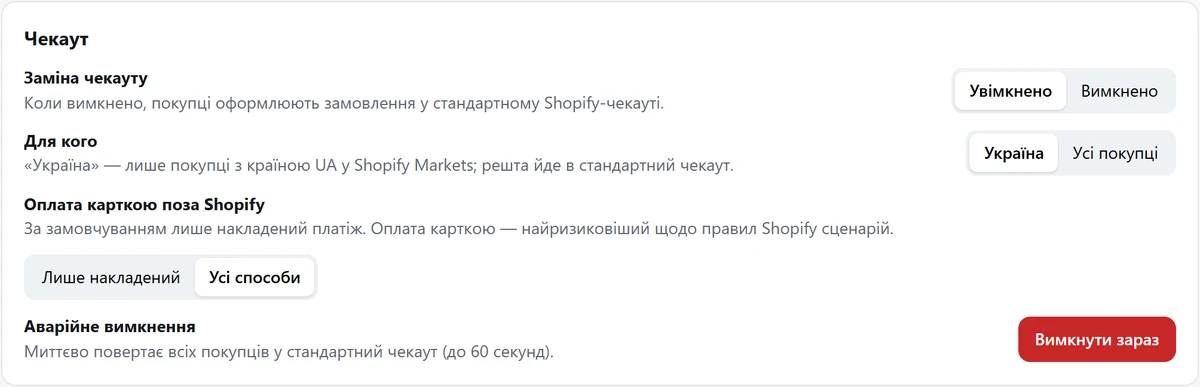
- Set up payment. By default, only cash on delivery is enabled; you turn on card payment outside Shopify yourself.
- Prepare your integrations. Enable “Order fields as in Chekly” if you need them. Configure your own 1C exchange or CRM to skip the
uac-testtag. To test receipts, connect a test cash register. - Test on your live store. Open the store via the special link and place several orders: branch, parcel locker, courier, cash on delivery, card payment, promo code. Check how they look in Shopify admin, 1C and your CRM.
- Switch buyers over. Enable checkout replacement for all buyers or only for buyers from Ukraine (country UA in Shopify Markets). Then turn off your previous checkout following its provider's instructions.
If you have a question at any step, support helps with connecting for free on Telegram.
What if something goes wrong after switching
UA Checkout has two safeguards:
- Automatic fallback. If UA Checkout is unavailable, buyers automatically get the standard Shopify checkout, so sales don't stop.
- Emergency shutdown. The checkout can be turned off with a single tap in the dashboard or in the owner's Telegram bot.
The checkout can be hosted on a subdomain of your store, for example checkout.myshop.ua. This requires a single CNAME record, and the HTTPS certificate is issued and renewed automatically. Such a subdomain is available on any plan. Shopify shows the “Are you sure you want to leave” dialogue when a buyer goes from the storefront to another domain, and this applies to any external checkout. For the store's own domains and their subdomains, this dialogue doesn't appear.
Shopify rules worth knowing before switching
Shopify's API License and Terms of Use (section 2.3.18) and Terms of Service (1.8, 4.5) do not allow processing payments and orders outside Shopify Checkout without Shopify's written permission. Similar services for Ukrainian stores have worked this way for years, but Shopify may restrict such integrations. UA Checkout informs you about this during connection. To reduce the risk, only cash on delivery is enabled by default, and automatic fallback to the standard checkout is in place. Read more in the article Is a third-party Shopify checkout legal in Ukraine.
These rules don't apply to WooCommerce, OpenCart and PrestaShop, as these are the store's own websites.
How much switching costs
| Plan | What's included |
|---|---|
| Pro | 790 UAH per month per store; no order limit; all payment and delivery methods and integrations; abandoned checkout reminders, BAS / 1C exchange; 0% on sales |
| Trial period | 5 days of Pro from connection, no card required; there is no free plan |
For comparison: as of October 2026, Chekly costs $15 or $60 per month plus 1% of each successful order and has a 7-day trial period. See a more detailed comparison on the UA Checkout, Chekly and Plata page.
During the 5 days of Pro you can test test mode and the BAS / 1C exchange free of charge. You can sign up with Google, Apple, Telegram or email.