During a sale, any small flaw in the ordering process becomes costly: an unclear delivery price, a disabled payment method or a button that leads nowhere. Fixing such things at the height of Black Friday is hard, so it's better to run through the checks in advance.
Below is a checklist for a Shopify store selling in Ukraine: checkout and delivery, payments, a fallback in case of failure, notifications, abandoned carts and analytics. For each item, we explain exactly what to check and how to do it in UA Checkout, if you use it or plan to connect it.
The Black Friday checklist at a glance
| Item | What to check | Where in UA Checkout |
|---|---|---|
| Checkout | The “Check out” and “Buy it now” buttons lead to a page with Nova Poshta | Checkout replacement in the dashboard |
| Delivery | The buyer sees the delivery date and price | Product weights, Nova Poshta card |
| Payment | Every enabled method works | Payment integrations, cash on delivery card |
| Discounts | The sale promo code applies | The promo code is entered on the checkout page |
| Fallback | Sales don't stop if something fails | Automatic switch to the Shopify checkout, emergency off switch |
| Notifications | You see every order and every problem | Telegram bot, CRM, SMS |
| Abandoned carts | There is a list and reminders | Abandoned checkouts, Viber or SMS on Pro |
| Analytics | Purchases reach your ad accounts | Meta, GA4, Google Ads, TikTok, GTM |
Is your checkout ready for sale-day traffic?
Start with what the buyer sees. Open the store on your phone and complete an order in full: city, Nova Poshta branch or parcel locker, payment method, promo code. Prices, discounts and stock are calculated by Shopify itself, and the finished order is created in the Shopify admin with delivery, payment method and tags, so check that side too.
What makes ordering faster for the buyer in UA Checkout:
- the «Найближчі до мене» (Nearest to me) button shows the 10 nearest branches and parcel lockers in the selected city with the distance to each; the browser asks for geolocation only after the tap, and it is never stored;
- the name, city and branch are remembered on the buyer's device for repeat purchases;
- checkout on the store's own subdomain (for example, checkout.myshop.ua, one CNAME record) is included in Pro. On Shopify, this removes the “Are you sure you want to leave” window that Shopify shows before redirecting to another domain.
If you're switching from another checkout, don't change it for everyone at the last minute. Test mode lets you try UA Checkout on your live store via a special link, and the orders get the uac-test tag. More details: how to test a new checkout before switching. You can view the page without placing a real order in the demo.
Does the buyer see the delivery price?
The buyer sees the estimated delivery date before paying (from the Nova Poshta API, using your key and sender city). The estimated price appears only when the parcel weight is known: every product in the cart has a weight in Shopify, or the store has set its own unit weight. Otherwise, the checkout says delivery is paid at the carrier's rates, without an amount.
What to do before the sale:
- Open the list of products without a weight in Shopify in the dashboard and fill it in, especially for sale items.
- Enter the packaging weight and the size of your usual box: UA Checkout calculates a light but bulky parcel by volumetric weight, just as Nova Poshta does.
- If you offer free delivery above a certain amount, set the threshold (optionally only for full online payment) and add your own text about the terms at the top of the page or in the delivery block.
- Enable automatic creation of the waybill (TTN) after an order so you don't have to create waybills manually at peak times.
Which payment methods should you enable?
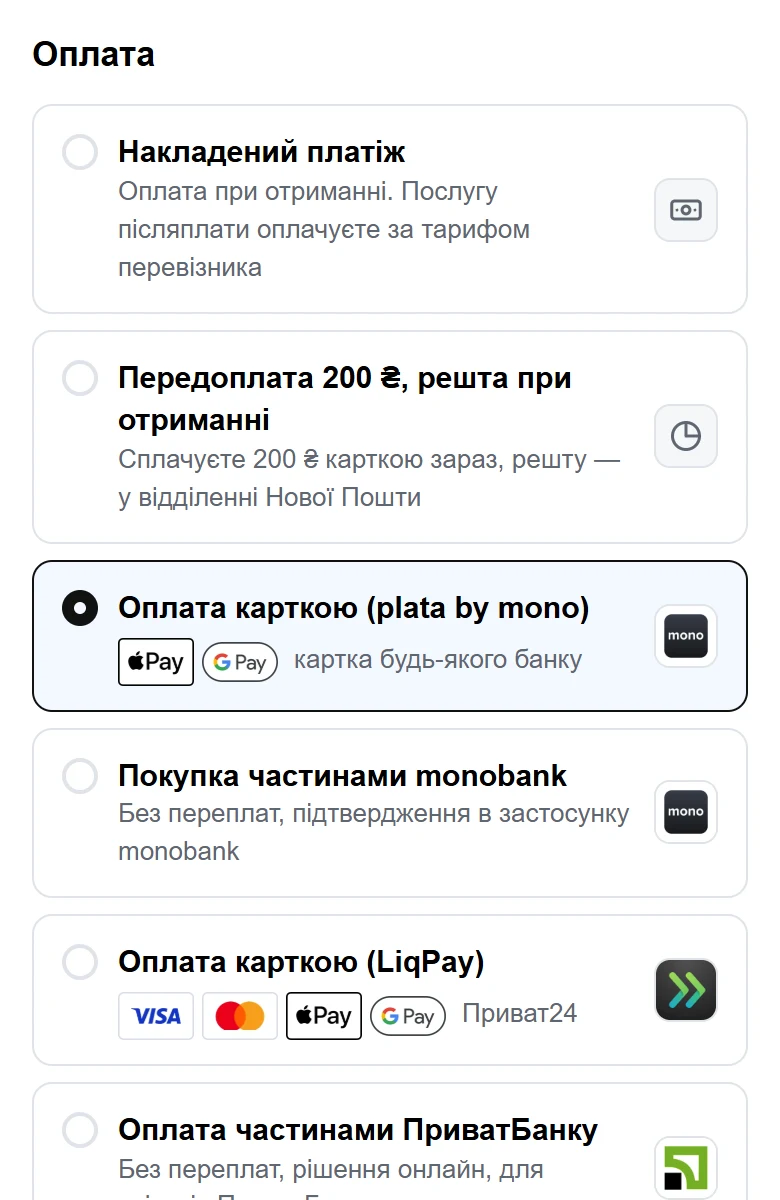
By default, only cash on delivery is enabled on Shopify; the seller enables card payment outside Shopify themselves. Before Black Friday, decide what you actually need:
- card, Apple Pay, Google Pay: monobank (plata by mono), LiqPay, WayForPay and other providers; the money goes straight to your accounts;
- instalment payments: monobank “Purchase in Parts” (a separate connection with a store-id and key from the bank), PrivatBank “Pay in parts” via a toggle in the LiqPay integration, A-Bank (from 300 UAH) and PUMB (from 500 UAH) via Tranzzo; the terms are set by the banks. Overview: instalment payments in Shopify;
- partial prepayment: for example, 200 UAH by card and the rest on delivery, optionally multiplied by the number of units;
- cash on delivery limits: it can be disabled above a certain number of units or order amount, and on Shopify also for products in specific collections.
Protection against refused parcels works too: when a buyer refuses a cash on delivery parcel, cash on delivery is disabled for their phone number.
What happens if something breaks?
This item is easy to put off, but check it in advance. If UA Checkout is unavailable, buyers automatically get the standard Shopify checkout. So make sure Shopify has delivery and payment settings that make sense as a fallback. The emergency off switch for the checkout replacement is a single tap in the dashboard or in the Telegram bot.
To be honest about the rules: Shopify's API License and Terms of Use (section 2.3.18) and Terms of Service (1.8, 4.5) do not allow processing payments and orders outside Shopify Checkout without Shopify's written permission. Similar services for Ukrainian stores have worked this way for years, but Shopify may restrict such integrations. UA Checkout tells you about this during setup and reduces the risk: by default, only cash on delivery and an automatic switch to the standard checkout. More details: is a third-party Shopify checkout legal.
If you want to keep the standard Shopify checkout, there is the «Помічник для стандартного чекауту Shopify» (Assistant for the standard Shopify checkout) mode: orders get Telegram notifications, CRM, SMS, receipts and waybills, but without the branch list and without UA Checkout payments during ordering.
How do you avoid missing orders and problems?
Each integration works once the store connects it in the dashboard:
- owner's Telegram bot: new orders, problems, a daily summary at 20:00 and the emergency off button;
- KeyCRM or SalesDrive: orders with Nova Poshta data, payment, UTM and click ID;
- TurboSMS or AlphaSMS: messages to the buyer (TurboSMS: Viber first, then SMS);
- Checkbox or Vchasno.Kasa: a fiscal receipt for every card payment automatically; the shift opens on its own before the first receipt and closes at 23:50 with a Z-report. How to set it up: Checkbox in Shopify.
Place a test order and make sure it has reached everywhere. Test orders don't get an automatic receipt on the live cash register.
What should you do about abandoned carts?
UA Checkout saves abandoned checkouts from buyers who entered a phone number, with CSV export. On Pro, you can send one reminder via Viber or SMS through your TurboSMS or AlphaSMS account to those who ticked «нагадати» (remind me): the link opens the same cart, optionally with a promo code, and the orders get the uac-recovered tag. Without an SMS service, there is the «нагадую сам» (I remind them myself) mode: the list shows who agreed and when. More: abandoned carts in Shopify in Ukraine.
Optionally, add an “Add to your order” upsell block with products from Shopify Search & Discovery, and payment links for sales on Instagram and Viber.
Do purchases reach your analytics?
Check the systems you use: Meta Pixel and Conversions API, Google Analytics 4 with Measurement Protocol, Google Ads conversions, TikTok Pixel and Events API, Google Tag Manager (optionally from a Stape server container or your own). Purchases are also sent from the server, so events aren't lost to ad blockers. Make a test purchase and find it in each account before your ads go live.
After the sale, the «Конверсія до і після» (Conversion before and after) report will show your checkout conversion for equal periods of up to 30 days before and after switching to UA Checkout. These are your own figures; UA Checkout doesn't promise any specific result.
How much it costs and whether you'll make it in time
Setup takes about 15 minutes without a developer; Telegram support helps for free. A new store gets 5 days of Pro free with no card required. After that, Pro costs 790 UAH per month per store, with no order limit and 0% of sales (as of November 2026). The trial is short, so plan to pay for Pro before the sale: without it, UA Checkout switches off, buyers see the standard Shopify checkout, and reminders and the assistant stop. Paying restores everything with the same settings. You can start by signing up.