You sell on Shopify in Ukraine and want to accept card payments through WayForPay. Shopify Payments is not available to Ukrainian businesses, and the standard Shopify checkout has no Ukrainian acquirers “out of the box”. So you need a solution that sends the buyer to pay in WayForPay and brings the completed order back into Shopify.
Below we explain what the WayForPay integration in UA Checkout gives the buyer and you, which keys to take from your WayForPay dashboard, how to set everything up and what happens after payment. We also describe the limitations and Shopify's rules honestly.
What WayForPay on Shopify through UA Checkout gives you
UA Checkout replaces the checkout step with a single page. It includes Nova Poshta, cash on delivery, Ukrainian payment systems and “Pay in parts”. WayForPay appears there as one of the payment methods.
| Who | What they get |
|---|---|
| Buyer | Payment by Visa or Mastercard card, Apple Pay or Google Pay on the WayForPay page. Right alongside in the same checkout is the choice of a Nova Poshta branch with the real delivery price shown before payment. |
| Store | Money straight to its own WayForPay account, with no intermediary. Orders in the Shopify admin with delivery, payment method and tags. Prices, discounts and stock are calculated by Shopify itself. |
UA Checkout never receives buyers' money and does not see card details. WayForPay charges payment fees according to its own rates, so check them directly with WayForPay.
Which keys you need from the WayForPay dashboard
To connect, you need three values from your WayForPay dashboard:
- merchant login — your store's identifier in WayForPay;
- secret key — used to sign requests to WayForPay;
- domain — the store domain registered with WayForPay.
Do not send your secret key to anyone via messengers. The UA Checkout support assistant on Telegram never asks for keys or passwords.
How to connect WayForPay to Shopify: step by step
First, connect the store itself to UA Checkout. The dashboard has step-by-step instructions: you create an app in the Shopify Dev Dashboard and paste its Client ID and Client Secret. The script is installed in your theme automatically. The whole process takes about 15 minutes and does not require a developer. Then:
- In your WayForPay dashboard, copy the merchant login, secret key and store domain.
- In the UA Checkout dashboard, open payment methods and select WayForPay.
- Paste the three values into the corresponding fields and save.
- Enable card payments outside Shopify. For a safe start on Shopify, only cash on delivery is enabled by default, so you switch on cards yourself.
- Place a test order and check that the payment is in WayForPay and the order is in the Shopify admin.
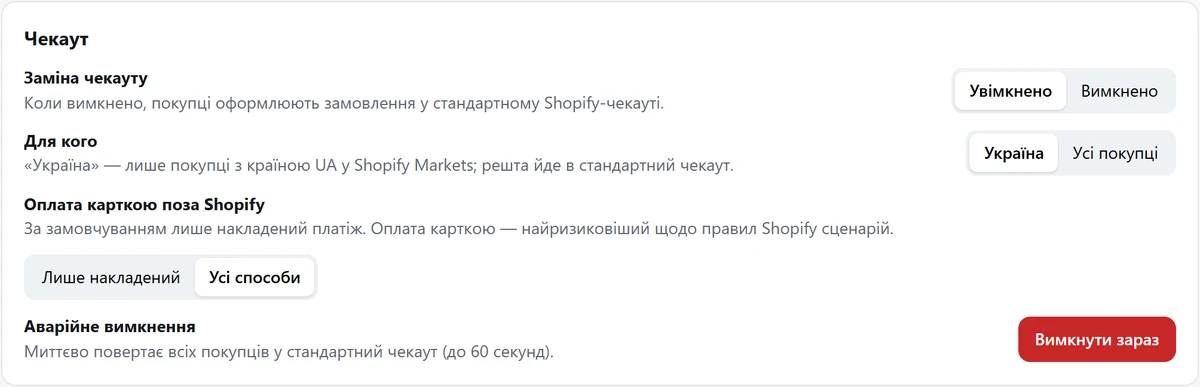
If something does not work, support will help you connect free of charge on Telegram. You can see what the payment page looks like for the buyer in the demo: real Nova Poshta branches, all payment methods and the thank-you page, without creating an order and without charging any money.
What happens after payment
- Order in Shopify. An order paid by card appears in the admin only after the payment is confirmed. Until then it waits as a draft, so an unfinished payment does not leave “hanging” unpaid orders.
- Fiscal receipt. If you have connected Checkbox or Vchasno.Kasa, a software cash register (PRRO) receipt is generated automatically for every card payment. More details in the article on Checkbox on Shopify.
- Waybill. A Nova Poshta or Ukrposhta waybill (TTN) is created from the dashboard in one click or automatically, and the tracking number is added to the Shopify order.
- CRM, SMS and Telegram. KeyCRM, SalesDrive, TurboSMS, AlphaSMS and the owner's Telegram bot work once you connect them in the dashboard.
- Refunds. A refund made in Shopify can optionally be passed to the payment system automatically. This is an option for monobank, LiqPay and other systems; check in the dashboard whether it is enabled for WayForPay in your store.
How this differs from other ways to connect WayForPay
| Method | How it works | Nova Poshta branch selection in checkout |
|---|---|---|
| External checkout (UA Checkout) | The buyer chooses delivery and payment on one page. An order paid by card is created in Shopify after the payment is confirmed. | Yes, with the delivery price before payment |
| Payment button on the Shopify thank-you page (e.g. UniCheck, Walnut Apps) | The order is created first, and payment happens afterwards. | No, a payment-only solution |
| Payment app inside the Shopify checkout | Shopify allows this, but the app covers payment only. | No |
From 26 August 2026, Shopify disabled additional scripts on the Thank you and Order status pages for stores not on Shopify Plus. This affected solutions that accepted payment on the thank-you page via scripts. Check with the provider of a specific solution how it works. UA Checkout was not affected: it is installed as a snippet in the theme and works before the Shopify checkout.
Limitations and Shopify's rules
Shopify's API License and Terms of Use (section 2.3.18) and Terms of Service (1.8, 4.5) do not allow processing payments and orders outside Shopify Checkout without Shopify's written permission. Similar services for Ukrainian stores have worked this way for years, but Shopify may restrict such integrations. UA Checkout warns about this during setup and reduces the risk: only cash on delivery is enabled by default, and if the service is unavailable, buyers automatically get the standard Shopify checkout. More details in the article is a third-party Shopify checkout legal.
These rules apply only to Shopify. WooCommerce, OpenCart and PrestaShop are your own websites. There you choose the payment methods on the UA Checkout page from the very start (see WooCommerce in Ukraine). Refunds from the Shopify admin, payment links and upsells are not confirmed for these platforms.
How much it costs
As of November 2026, every new store gets 5 days of Pro free, no card required. After that, Pro costs 790 UAH per month per store: unlimited orders, 0% of sales, all payment and delivery methods and integrations. Without payment, UA Checkout switches off and buyers get the standard Shopify checkout, so sales do not stop. The articles on monobank and LiqPay will help you compare WayForPay with other providers. You can start by registering.